E4CC Wiki logo
  • Home 
  • Our Values 
  • Employee Benefits 
  • Wiki 
Wiki
    • How to use the wiki
    • When Do I get Paid
    • Candor
    • Evaluation system
    • Kahoot links
    • How to do book quiz
    • How to do deep level interviews
    • How to do movie oral presentation
    • How to do next level evaluation
    • How to do monthly evaluation
    • Where to check b4 swaps
    • How to give feedback
    • How to do Rapport
    • How to do Earn the Right
    • How to Set the Tone
    • How to set Clear Expectations
    • How to check Homework
    • How to do Disciplinary Process
    • How to create a Positive environment
    • How to do Grammar/DPCP
    • How to take Attendance
    • How to do Speaking Activity & Automatic Fluency/DPCQ
    • How to do Expositions
    • How to do TPRS
    • Cameras always on
    • How to Submit evaluations
    • Intermediate interviews
    • Best practices 1
    • Best practices 2
    • Best practices 3
    • Best practices 4
    • Best practices 5
    • Best practices 6
    • How to Log In
    • How to start a meeting
    • How to use the annotate option
    • How to share screen
    • How to use the Zoom timer
    • How to update Zoom
    • How to use a virtual background
    • How to create breakout rooms
    • Zoom tools summary
    • How to do LISTA
    • How to use the student platform
    • How to change my schedule
    • Customer service number
    • Referral program
    • Trainee benefits
    • How to do focus groups
    • How to submit QA recaps
    • How to do nesting
    • What are the 5 stars
    • How to use the wiki
    • When Do I get Paid
    • Candor
    • Evaluation system
    • Kahoot links
    • How to do book quiz
    • How to do deep level interviews
    • How to do movie oral presentation
    • How to do next level evaluation
    • How to do monthly evaluation
    • Where to check b4 swaps
    • How to give feedback
    • How to do Rapport
    • How to do Earn the Right
    • How to Set the Tone
    • How to set Clear Expectations
    • How to check Homework
    • How to do Disciplinary Process
    • How to create a Positive environment
    • How to do Grammar/DPCP
    • How to take Attendance
    • How to do Speaking Activity & Automatic Fluency/DPCQ
    • How to do Expositions
    • How to do TPRS
    • Cameras always on
    • How to Submit evaluations
    • Intermediate interviews
    • Best practices 1
    • Best practices 2
    • Best practices 3
    • Best practices 4
    • Best practices 5
    • Best practices 6
    • How to Log In
    • How to start a meeting
    • How to use the annotate option
    • How to share screen
    • How to use the Zoom timer
    • How to update Zoom
    • How to use a virtual background
    • How to create breakout rooms
    • Zoom tools summary
    • How to do LISTA
    • How to use the student platform
    • How to change my schedule
    • Customer service number
    • Referral program
    • Trainee benefits
    • How to do focus groups
    • How to submit QA recaps
    • How to do nesting
    • What are the 5 stars
  1. Home
  2. Wiki
  3. Evaluation system
  4. How to Do Deep Level Interviews

How to Do Deep Level Interviews

Posted on April 1, 2024  (Last modified on April 5, 2024) • 1 min read • 93 words
Share via
E4CC Wiki
Link copied to clipboard

How to Do Deep Level Interviews

On this page
  • Why?
  • Tutorial
  • Class flow
  • Submitting evaluations
  • Important

Why?  

To push your trainee and have clarity on which areas they need to improve for the final evaluation.

We do deep level interviews on week 2 day 5

Tutorial  

Class flow  

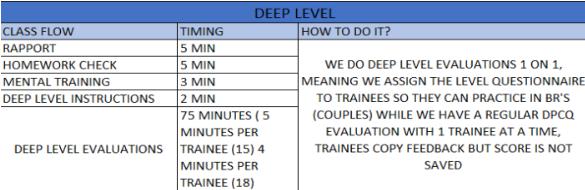
Use the questionnaire inside the interview guide according to each level
  • For trainees 
  • For coaches

Submitting evaluations  

You don’t submit the score to the evaluation system when doing a deep level interview.

Important  

If a student missed the deep level evaluation, they will have to wait until the next level evaluation to be evaluated (2 weeks)
 How to Do Book Quiz
How to Do Movie Oral Presentation 
On this page:
  • Why?
  • Tutorial
  • Class flow
  • Submitting evaluations
  • Important
Copyright © 2024 Saul Castellanos | Powered by Hinode  .
E4CC Wiki
Code copied to clipboard